

What is OOUX?
OOUX is a methodology which will help us design an easy to navigate digital world for our users.
- OOUX stands for Object Orientated User Experience
Why OOUX?
We all learn to navigate the world through objects and their familiarity, we all build our own internal recognition system, so we can often navigate the world without much effort, as we don’t need to seek information if a known pattern is in use.
For example: when navigating transport systems such as driving a car where roadsigns and their shape, icon and colour quickly inform us, or Public Transport where we know the shape or colour of the signs to denote a station.
We can use this simple language of object groupings work in the digital world, by identifying and categorising them. We can then use those objects to create a type of digital lego so that we create the object once and then reuse it across the site, such as an events key details being used in a page or a listing.
Noun first objects
Thinking Noun first to identify the objects is the first key step, for example on the website we will initially be looking for objects such as:
- News story
- Research study
- Personal blog
Rather than what we want to do on the site:
- Search
- Choose a service
- Signup
Benefits
By using this method of an object up process rather than thinking about content pages and sections of the site in isolation, there are many benefits:
– Implied recognition
Objects marry up with the users’ ‘mental model’ and this unconscious and abstract familiarity enhances their experience.
– Content consistency
Every instance of an object will have the same attributes. This helps users to compare, navigate and understand the offering quickly.
– Reduce effort and duplication
One instance of core content in the CMS means objects can be iterated without affecting the rest of the site.
– Speeds up journeys
Object types can be styled differently so users can quickly identify them – speeding up journeys and information retrieval.
– Enhances search and filter
As the objects have consistent data behind them users can refine and filter their search easily.
– Content through content navigation
Embeds a richer more recognisable contextual navigation – representations of related objects can easily be presented on relevant pages and automatically associated.
Using the objects
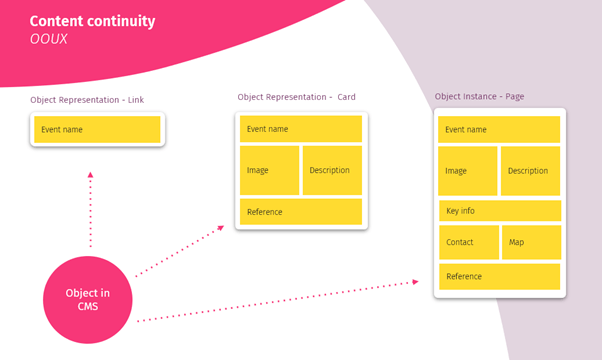
In the simplest form, this is where we start creating the connected content model we talked about at the beginning of this project.
The next stage is to use a model called ORCA to start understanding the requirements of the objects in more detail, which we will introduce in the next post.
 Manifesto X Breast Cancer Now
Leave a comment